How to Build a Solar Backup System for Under $5,000
In 1752, Benjamin Franklin flew his famous kite in a thunderstorm, helping unlock the mysteries of electricity. Nearly 130 years later, Thomas Edison would illuminate the world with the first practical light bulb. Today, we rarely pause to marvel at these innovations - flipping a switch for light or plugging in a laptop has become second nature. Yet our modern comforts rest entirely on a complex and sometimes fragile power grid that we take for granted.

Living in Puerto Rico, I've experienced firsthand how precious reliable electricity truly is. While the local power grid generally works well, occasional outages from storms or maintenance are stark reminders of how dependent we are on this invisible force for everything from air conditioning and refrigeration to internet connectivity and medical devices.
Today, I want to share how I was able to build a home backup system (DIY) with no electrical engineering background for less than $5000, and how you can too.
Background
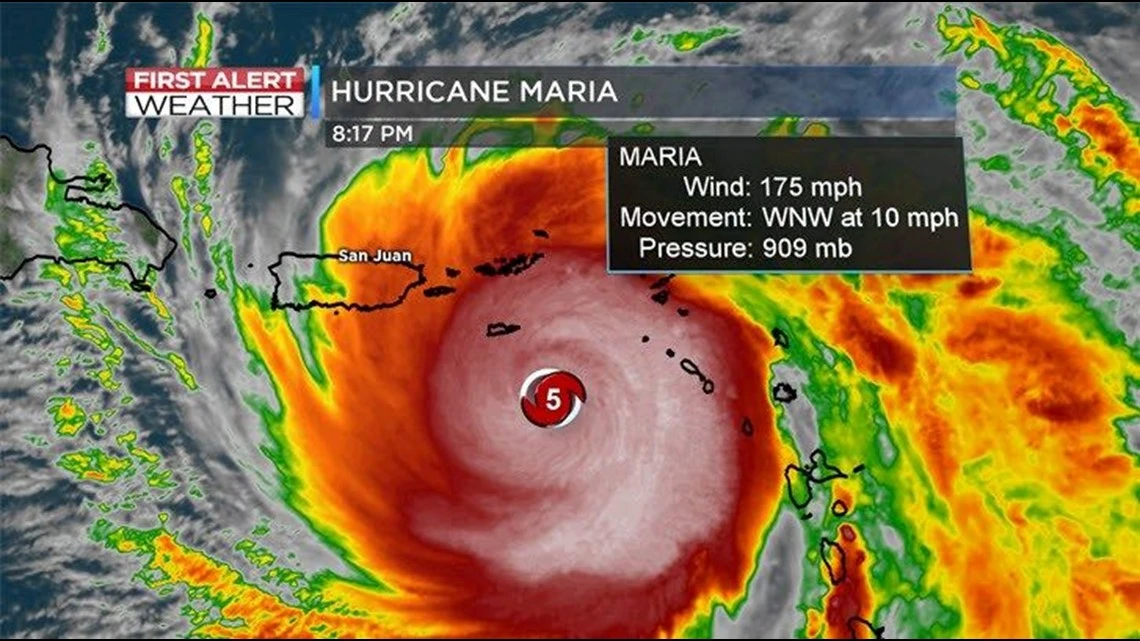
In 2017, Hurricane Maria - a devastating Category 5 storm with sustained winds over 155 mph - exposed just how fragile our power infrastructure really is. The entire island lost power, and for many communities, electricity wasn't restored for over 6 months. This wasn't just an inconvenience - it was a humanitarian crisis that affected everything from food storage to medical care.
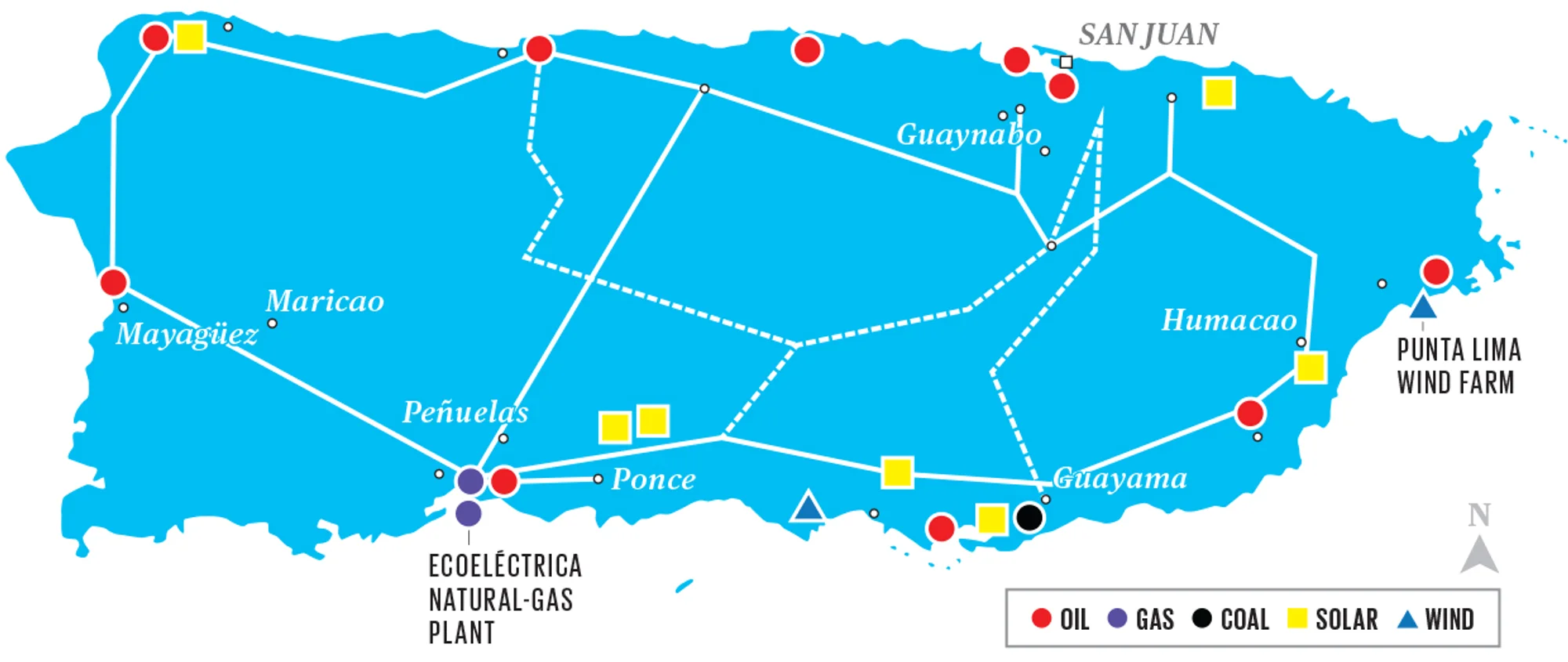
The vulnerability stems from decades of neglected infrastructure. Our power grid is a patchwork of aging components, with many critical elements like transformers and transmission lines operating well beyond their intended lifespan. This fragility is compounded by geography - most of our power generation happens in the south, while the majority of the population lives in the north, requiring an extension transmission network across mountainous terrain.
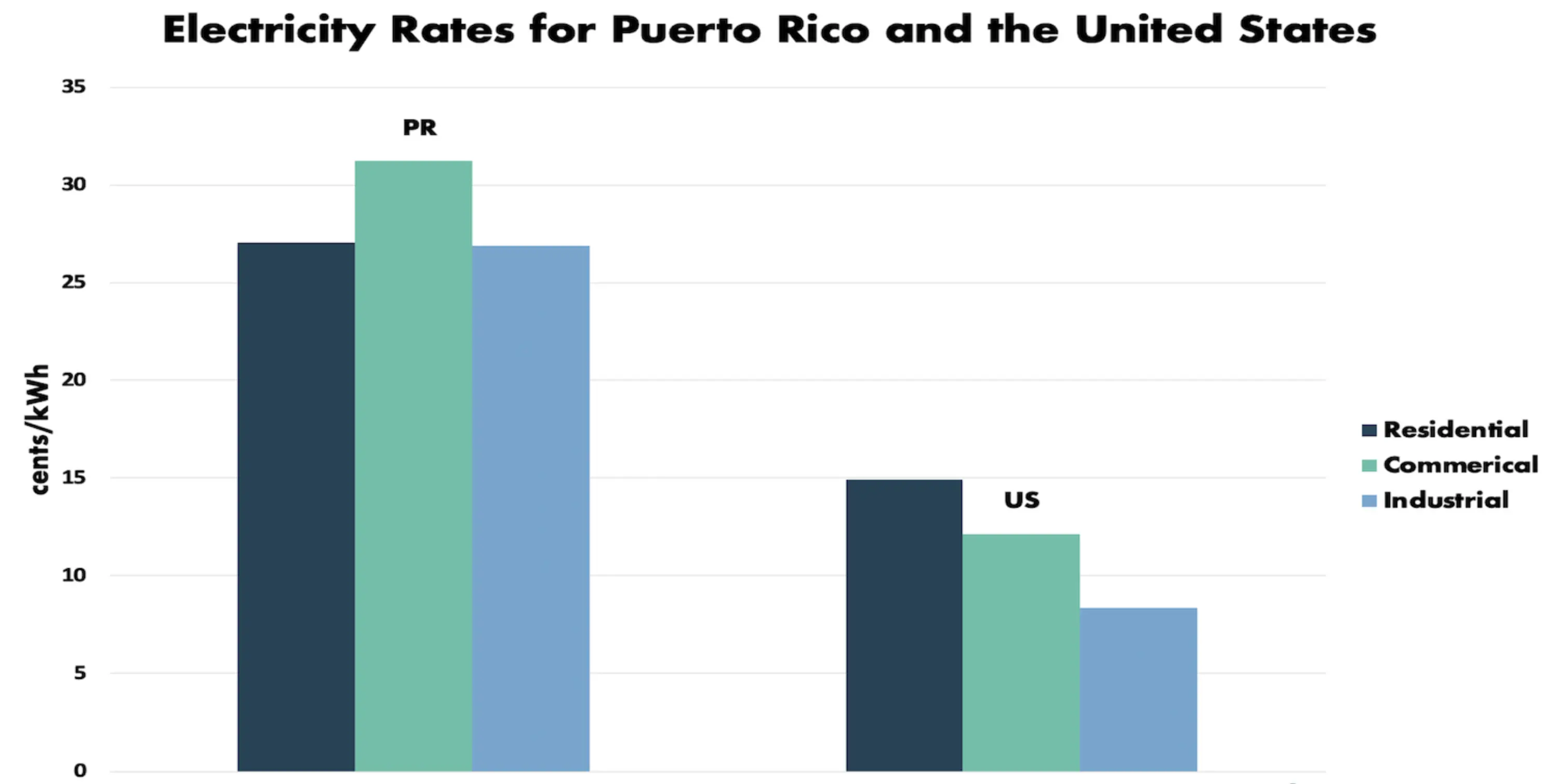
The cost of this inefficient system falls directly on residents. Puerto Ricans pay between $0.27 - $0.35 per kilowatt-hour (kWh) for electricity - nearly triple the US mainland average of $0.12/kWh. This high cost is driven by three main factors:
- Constant infrastructure repairs and maintenance
- Heavy reliance on imported fossil fuels, which power 95% of our grid (compared to 78% on the mainland)
- The Jones Act's shipping restrictions, which force Puerto Rico to use expensive U.S.-flagged vessels for fuel transport between American ports, even when cheaper international options are available. This century-old maritime law adds significant costs to nearly every shipment of fuel and equipment reaching the island
Even today, five years after Maria, regular outages remain a fact of life. While most last less than 24 hours, multi-day blackouts still occur several times a year, especially during hurricane seasons.
These outages aren't merely inconvenient. They can be life-threatening for vulnerable residents. Many locals rely of electricity for critical medical equipment like oxygen concentrations, dialysis machines, or refrigerated medications. For them, a reliable power supply isn't a luxury-it's a necessity.
The reality drove me to create this guide with two primary objectives:
- Document how I built a reliable, cost-effective backup power system to improve my own resilience
- Provide a practical blueprint for others to achieve energy independence, regardless of their technical background
While I don't have formal electrical engineering training (my background is in computer science), I've done extensive research to understand the fundamentals of power systems and hope to pass those learnings to you.
DISCLAIMER: This guide is for informational purposes only. Please consult with a qualified/licensed electrician in your local area before attempting any electrical work. Proceed at your own risk. Improper installation can result in serious injury or death.
Essential Components
Every home solar backup system requires these core components:
- Solar Panels
- Copper Wire (various gauges and lengths)
- Inverter
- Transfer Switch(es)
- Battery
- Fuses
While this may seem daunting if you're new to electrical systems, the basic concept is straightforward:
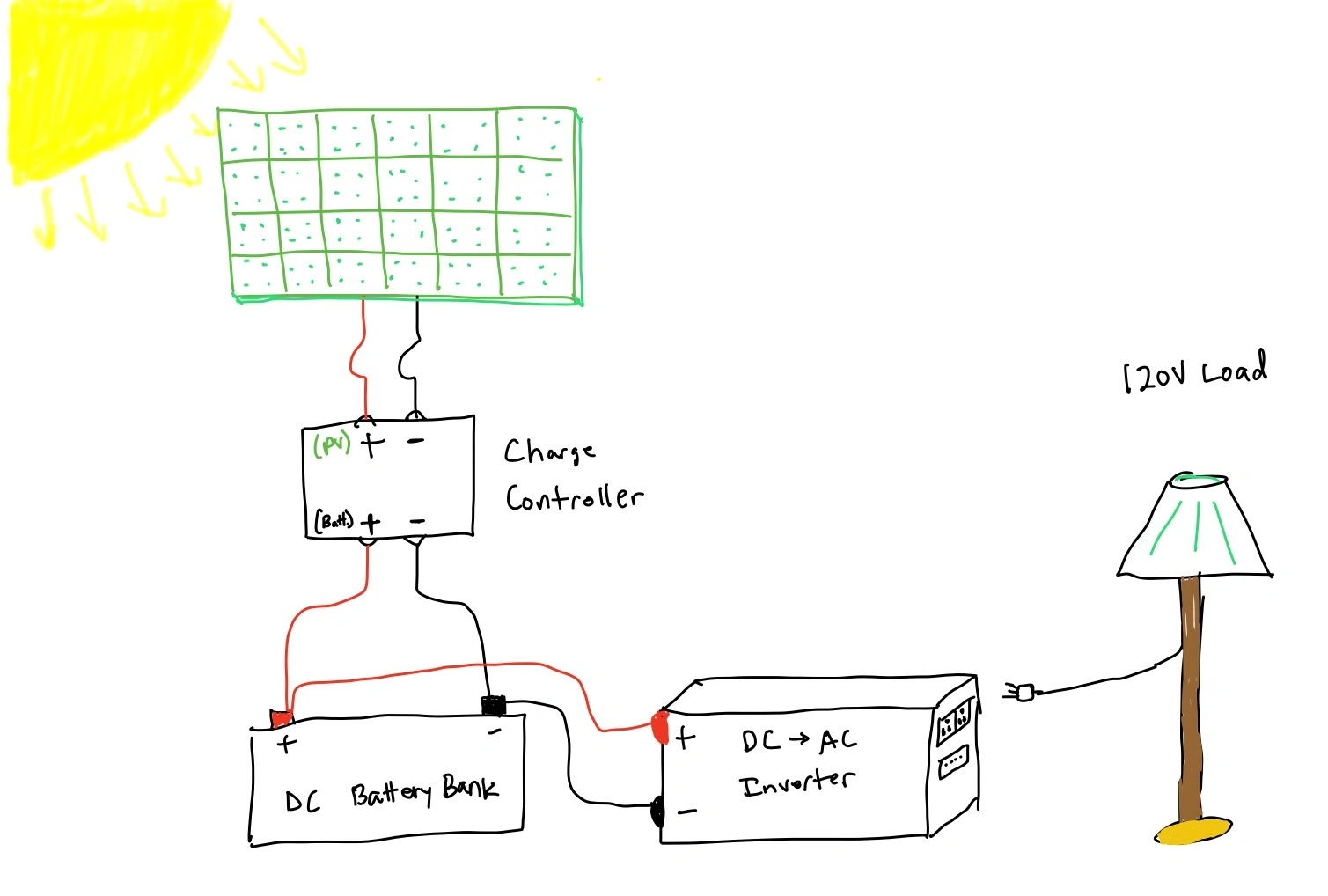
- Solar panels capture sunlight and convert it to direct current (DC) electricity
- Copper wiring creates the electrical pathways between components - from panels to inverter to battery
- The inverter transforms direct current (DC) into alternating current (AC) that powers your home
- Transfer switches integrate your solar power with your home's electrical panel
- Batteries store energy for use when sunlight isn't available
- A charge controller optimizes the solar DC voltage to efficiently charge your batteries
- Fuses provide critical protection against electrical surges and faults
Optional Enhancements
- Bus Bars - These efficiently connect multiple wires together. While not required, they can reduce copper wire usage, which is increasingly expensive.
- Battery Monitor - Some batteries include built-in displays, but a separate monitor may be needed to track charge levels
- Wire Conduits - These improve aesthetics by neatly concealing wiring
- Battery Disconnect Switch - Allows for easy battery isolation without manually removing connections
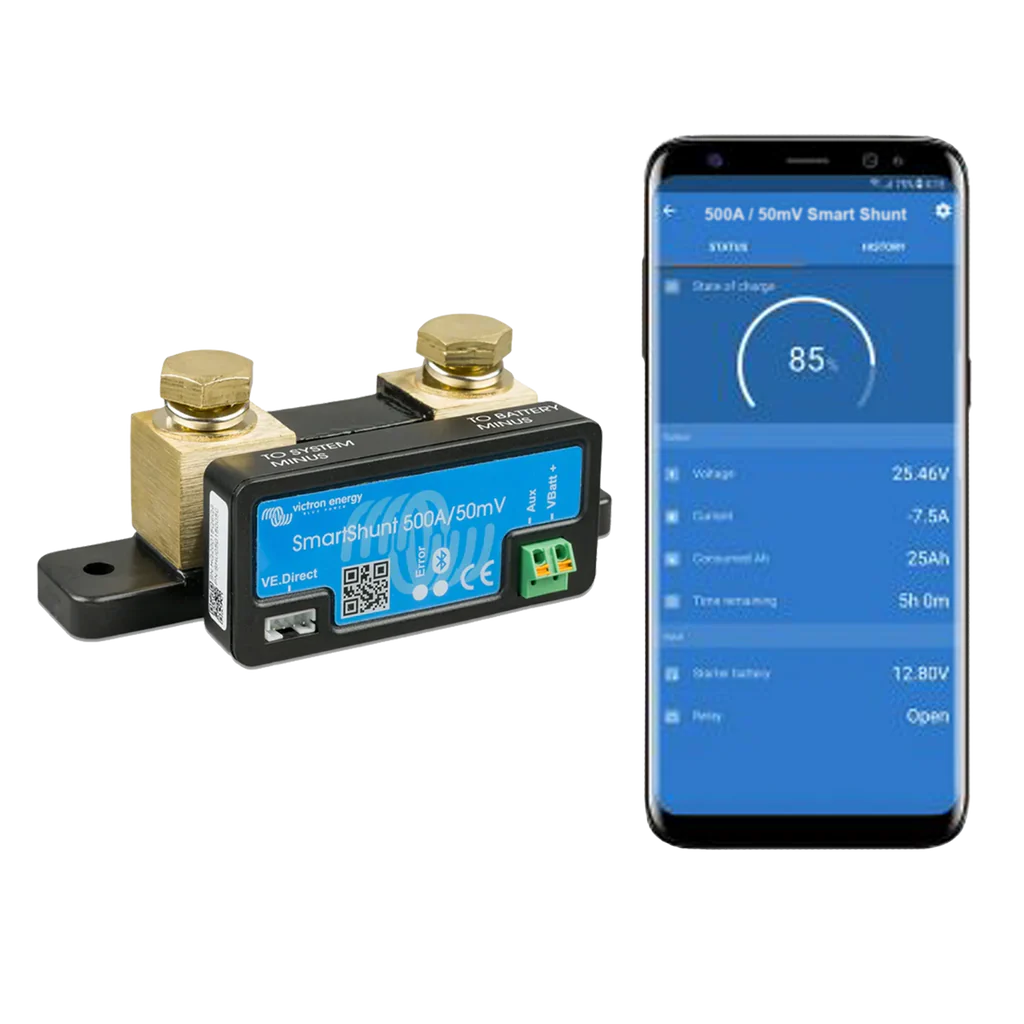
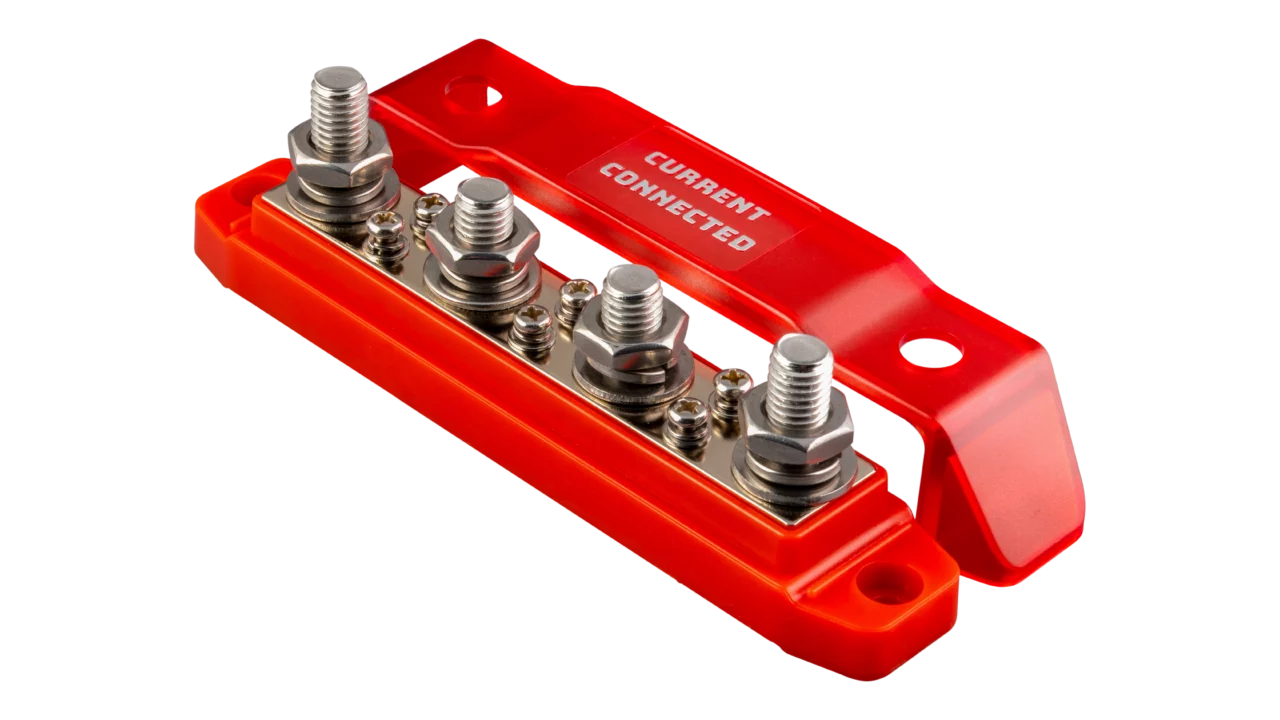
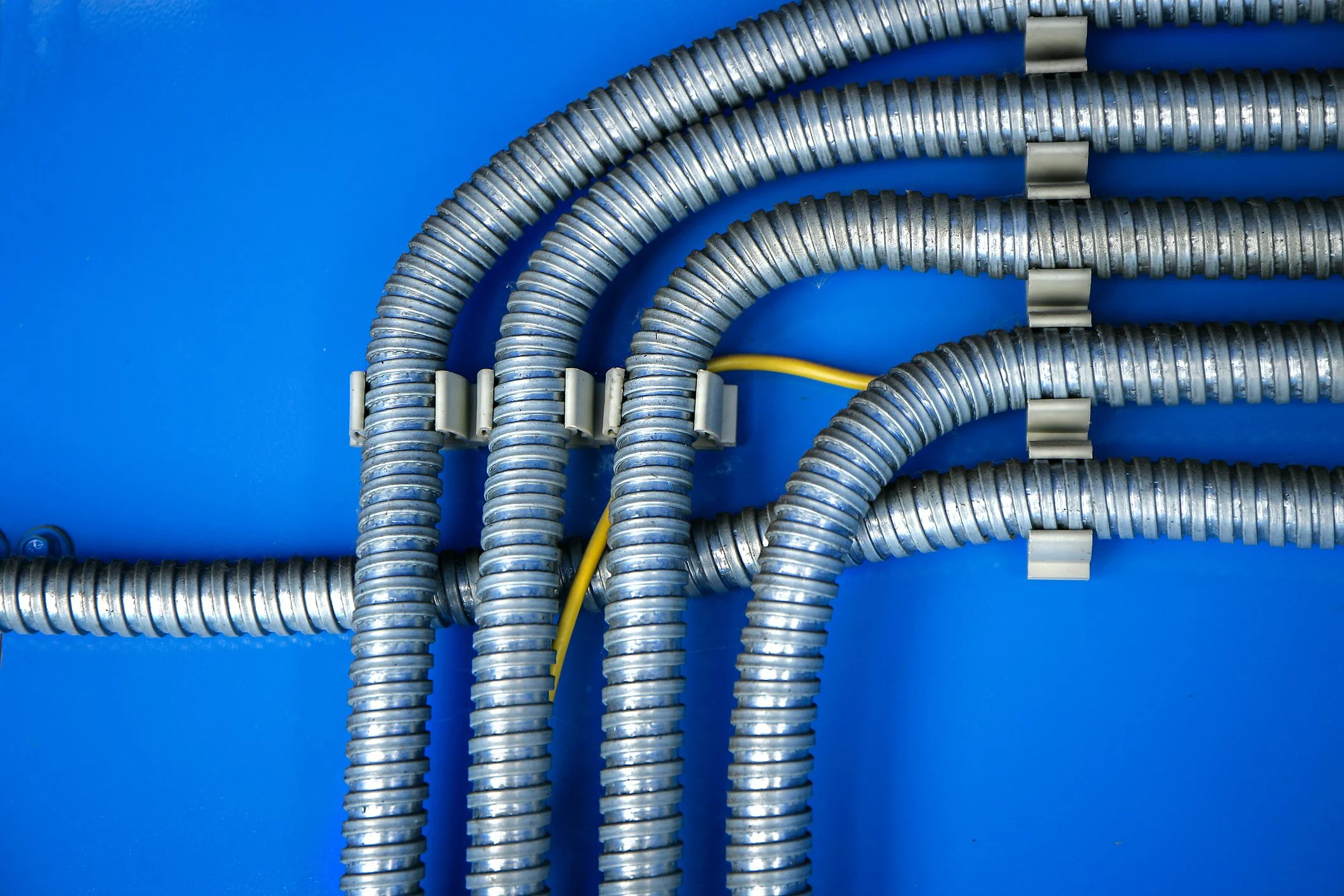
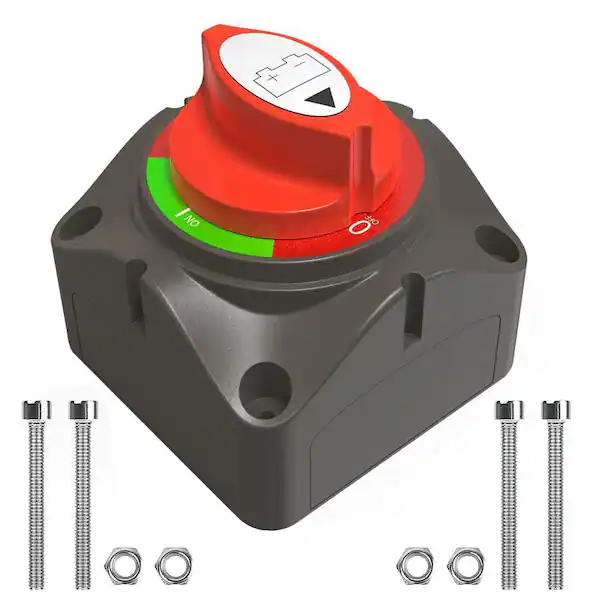
Though not essential, these additions significantly enhance system usability and maintenance while remaining relatively affordable.
Understanding Your Energy Needs
Let's start with the basics: how much power does your home actually need? The average US household uses about 30 kilowatt-hours (kWh) each day, but this can vary quite a bit depending on your situation.
Daily Energy Usage
Your home likely falls into one of these categories:
-
Low Usage (10-20 kWh/day)
- Perfect for small homes or apartments
- You probably use AC sparingly
- Your appliances are energy-efficient
-
Medium Usage (20-35 kWh/day)
- Typical for an average single-family home
- You use AC/heating moderately throughout the day
-
High Usage (35+ kWh/day)
- Common for larger homes
- You run AC/heating frequently
- You have extra power draws like pool pumps or multiple refrigerators
Planning Your Solar System
Let's say you want to generate 10KWH of electricity per day – enough to run your essential appliances. Here's how to figure out what you need:
- First, count your daily sun hours (let's use 7 hours of good sunlight)
- Then, calculate your hourly needs: 10KWH ÷ 7 hours = 1.43KW per hour
- Finally, add some extra capacity for cloudy days
Choosing Your Solar Panels
Solar panels typically come in sizes from 200W to 500W. When shopping for panels, you'll want to consider:
- How much space you have for installation
- Your budget
- Local weather conditions
Here's a money-saving tip: look at the cost per watt when comparing panels:
- Used panels cost around $0.20/watt (I found 250W panels for $50 each)
- New panels run $0.60-$0.80/watt
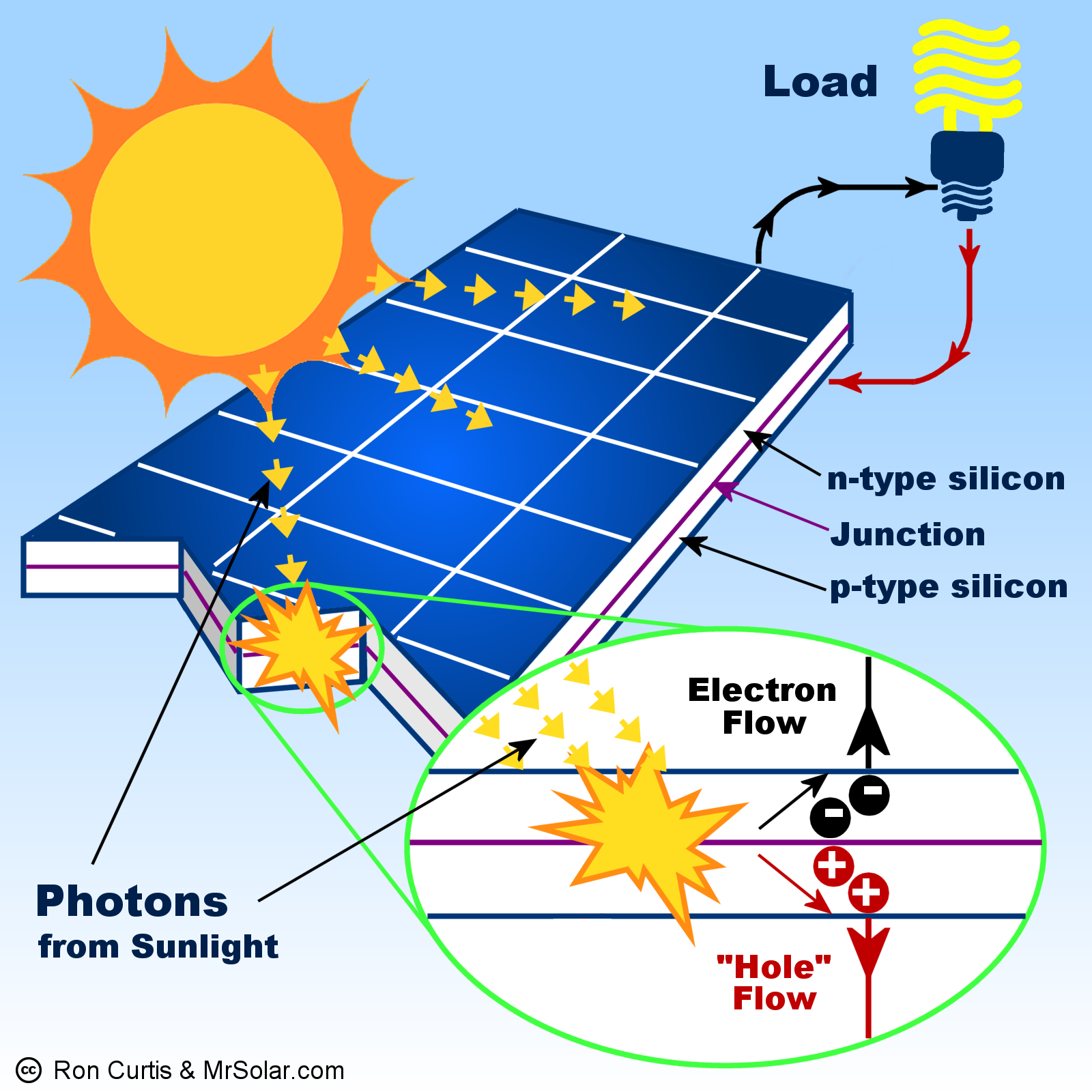
While used panels might be 10-15% less efficient, they can save you a lot of money. I recommend checking out Eco Direct for new panels, but there are many other options online.
Let's look at a real example: To get that 1.43 KW/hour we calculated earlier, you could use:
- Eight 250W panels (like I did), or
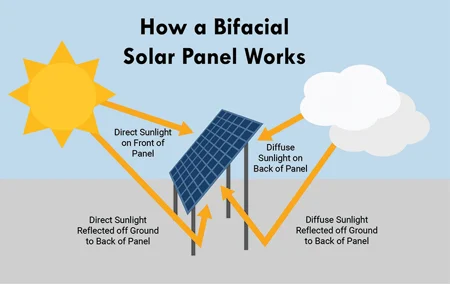
- Four 500W bifacial panels if you prefer newer technology
Planning Your Battery System
Once you've got your solar panels figured out, you'll need batteries to store that energy. For a system generating 10KWH daily, you'll want at least that much storage capacity – I'd recommend 10-12.5KWH to be safe.
You have several battery options to consider:
- Lithium Iron Phosphate (LiFePo4) - My top recommendation
- Lead Acid
- AGM (Absorbed Glass Mat)
- Gel Batteries
| Battery Type | Pros | Cons |
|---|---|---|
| Lithium Iron Phosphate (LiFePo4) | • Longest lifespan (10-15 years) • Deep discharge capable (80-90%) • Lightweight • No maintenance required • Fast charging |
• Higher upfront cost • Special shipping requirements • Temperature sensitive • Requires BMS |
| Lead Acid | • Lowest upfront cost • Widely available • Simple technology • Easy to ship |
• Short lifespan (3-5 years) • Limited depth of discharge (50%) • Heavy • Requires maintenance • Slow charging |
| AGM | • Maintenance-free • Good shock/vibration resistance • No spill risk • Moderate lifespan (4-7 years) |
• Higher cost than flooded lead-acid • Limited depth of discharge (50%) • Temperature sensitive • Heavy |
| Gel | • Deep cycle capable • No spill risk • Good for extreme temperatures • Low maintenance |
• Expensive • Very sensitive to overcharging • Slow charging required • Special charging profile needed |
I prefer Lithium Iron Phosphate because they handle deep discharges better and last significantly longer. Just keep in mind that shipping these batteries requires special handling – you can't just pop them in the mail through USPS or UPS without proper documentation. If you're in Hawaii or Puerto Rico like me, you'll need freight shipping1.
Battery Storage Safety
When storing multiple LiFePo4 batteries, proper organization is crucial for both safety and maintenance. I use a heavy-duty shelving unit rated for 250 pounds per shelf, which easily handles two 12V 200AH batteries per level (each battery weighs about 48 pounds).
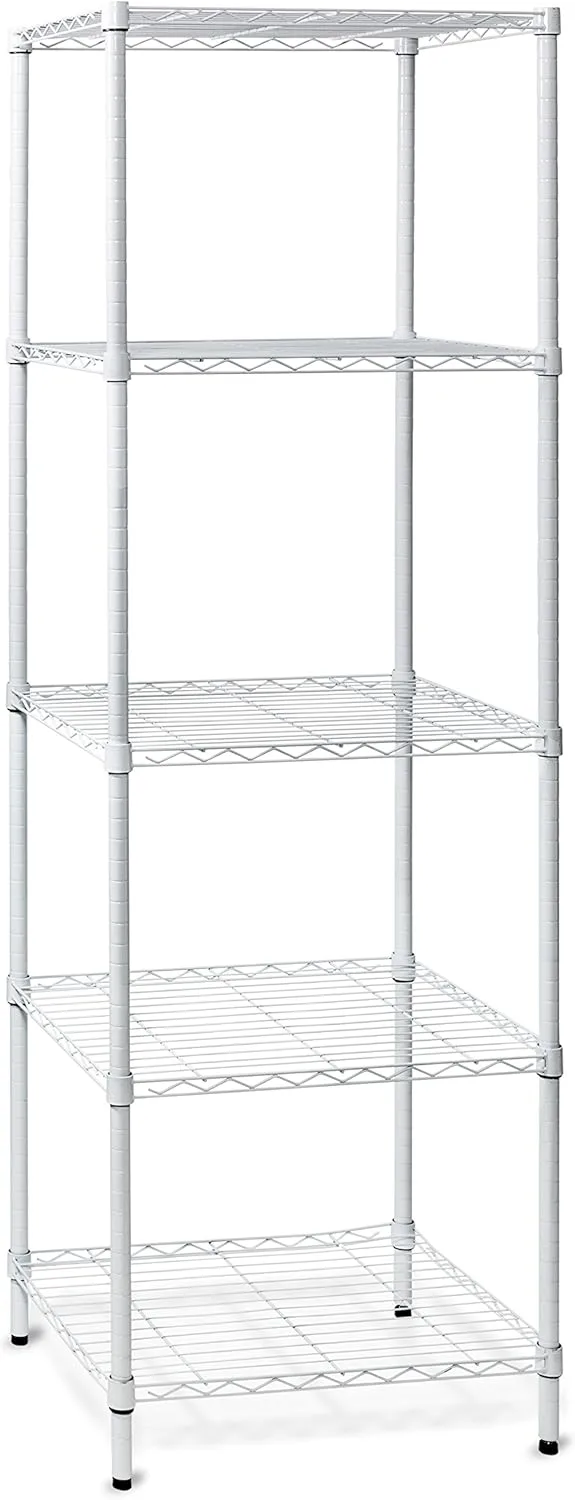
Key considerations for battery storage:
- Keep batteries elevated off the ground to prevent moisture damage
- Ensure proper ventilation around each battery
- Allow enough space for battery maintenance and terminal access
- Use sturdy, non-conductive shelving that can handle the weight
- Keep batteries at room temperature when possible
Voltage and Wire Safety
Here's something crucial: for any system around 10KWH or larger, you'll want to use a 48V setup. Here's why:
Remember the formula: Watts = Amps × Volts. Higher voltage means you need fewer amps to deliver the same power. This is really important because high amperage can make wires hot – sometimes dangerously hot.
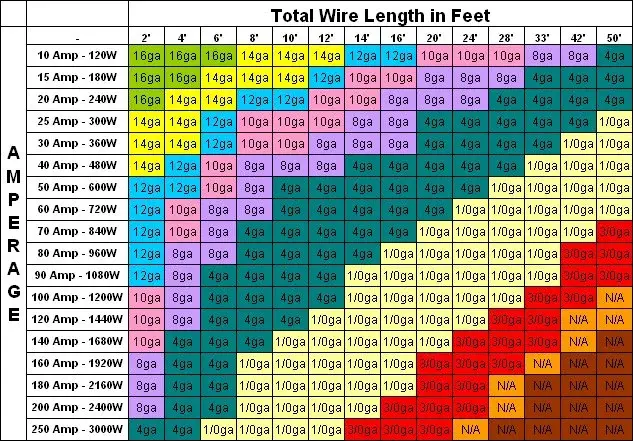
A 48V system can safely handle about 100A with 2-gauge wire, making it ideal for home backup systems. In contrast, smaller 12V or 24V systems require dangerously high amperage to deliver the same power - for example, a 4800W load would need 400A at 12V versus just 100A at 48V.
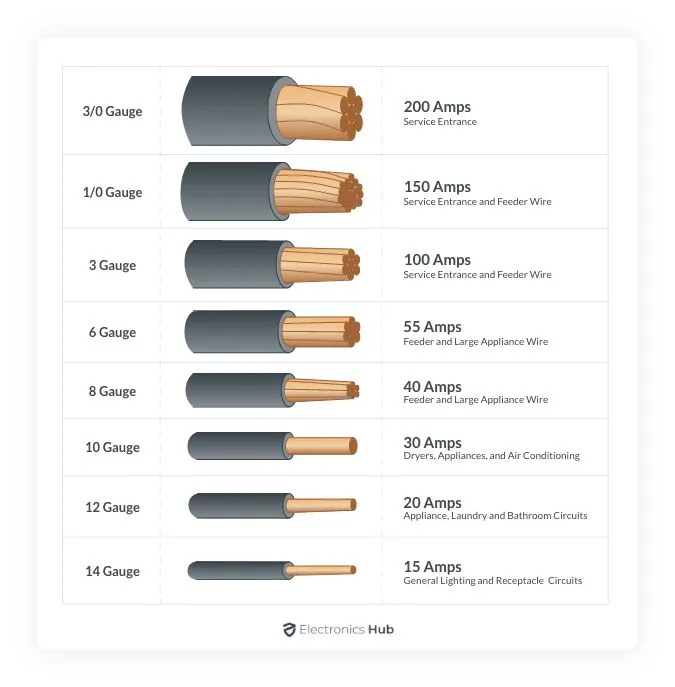
When selecting wire gauge, it's always safer to go bigger (lower gauge number) than necessary. While thicker copper wire costs more upfront, it provides better safety margins and lower resistance. Using wire that's too thin creates a serious fire hazard due to heat buildup from resistance. Some key guidelines:
- 2 AWG wire can handle ~100A at 48V
- 4 AWG wire can handle ~70A at 48V
- 6 AWG wire can handle ~55A at 48V
If cost constraints prevent using appropriately thick wire, you can increase system voltage to reduce amperage. However, remember that any voltage conversion (like 96V to 48V through a charge controller) will increase amperage on the output side, requiring appropriate wire gauge for that section.
Proper Wire Crimping: A Critical Skill
One of the most important skills for building a solar system is proper wire crimping. Poor connections can lead to voltage drops, heat buildup, or even fires. Here's what you need to know:
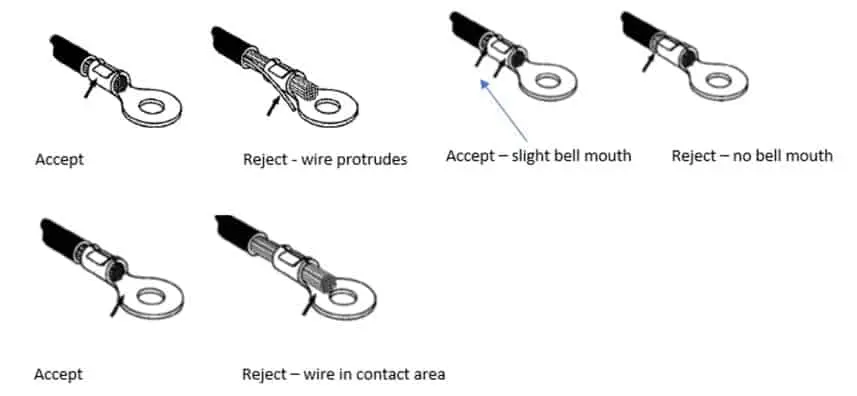
Essential crimping tips:
- Always use the correct size lug for your wire gauge
- Strip the exact amount of wire insulation needed (not too much, not too little)
- Use a ratcheting crimper that won't release until proper pressure is applied
- Make two crimps per connection for extra security
- Gently tug test each connection
- Use heat shrink tubing to protect connections
For this build, I recommend either:
- AMZCNC Hydraulic Crimper ($45) - Great for larger gauge wires (12-2/0 AWG), uses hydraulic pressure for consistent crimps
- iCrimp Battery Cable Tool ($34) - More compact option for 8-1/0 AWG, includes a wire cutter
I personally use the AMZCNC model since it handles the full range of wire sizes needed for solar installations. The hydraulic action makes crimping large gauge wires much easier on your hands.
Electrical System Design
Understanding how to properly wire your components is critical for both safety and efficiency. Let's break down the key connections and considerations:
Battery Configuration for 48V System
To achieve our target 48V system voltage, we need to properly configure our 12V batteries:
- First, balance batteries by connecting them in parallel
- Then, arrange in series to reach 48V (4 x 12V batteries)
- Finally, connect multiple 48V groups in parallel to increase capacity
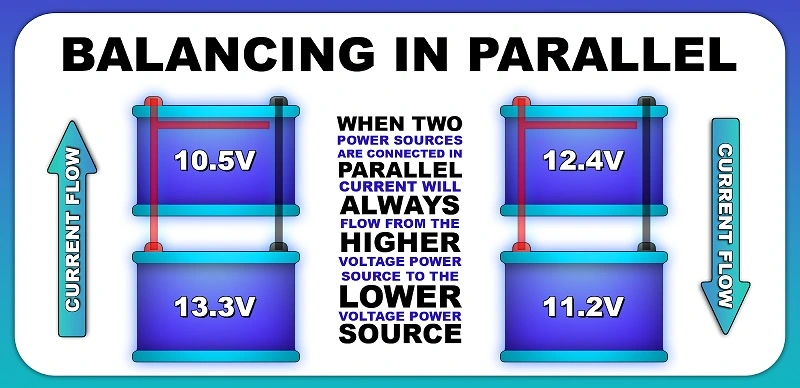
Important: Always balance batteries in parallel first to equalize voltages. This maximizes efficiency and battery life by ensuring all cells start at the same voltage level.
Here is a video that walks you through balancing your batteries. It's as simple as connecting the batteries in parallel. Make sure positive terminals are connected only to positive, and negative terminals only to negative.
If you cross wires, you run the risk of shorting a battery, which is dangerous.
Expanding Capacity: To increase your battery bank capacity, you can add multiple 48V battery sets in parallel - for example, if using 12V batteries, first balance and connect groups of 4 batteries in series to create 48V, then connect multiple 48V sets in parallel to expand capacity.
Core System Connections
Here's the recommended connection sequence from batteries to inverter:
- Battery bank → Battery disconnect switch (master control)
- Disconnect switch → Class T fuse (system protection)
- Fuse → Bus bars (power distribution hub)
- Bus bars → Various components:
- MPPT charge controller
- Battery monitor
- Inverter
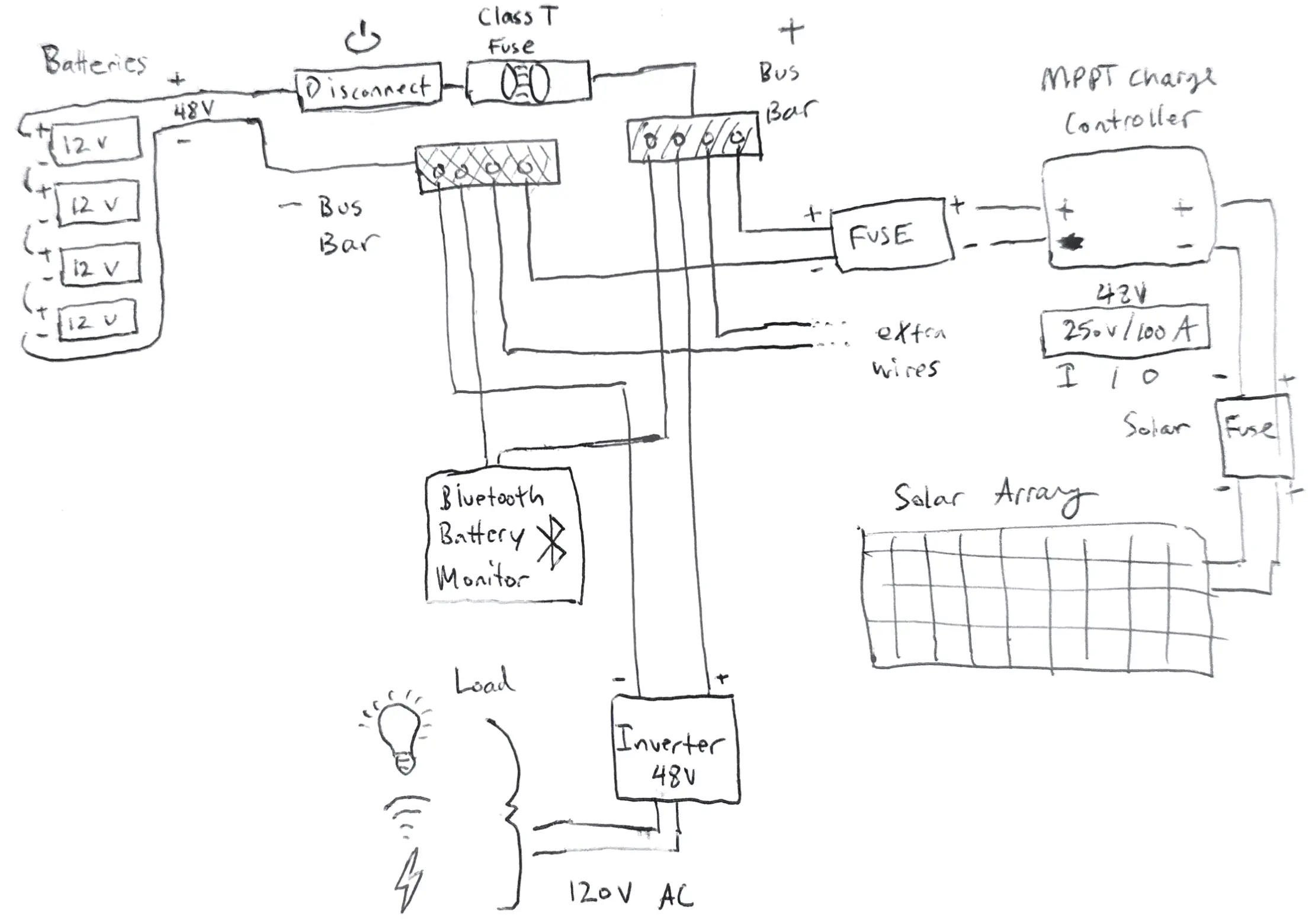
Solar Panel Configuration
For maximum MPPT efficiency, configure your panels to achieve higher voltage:
- Target voltage should be well above battery voltage (48V)
- Higher voltage = better MPPT efficiency
- Stay within charge controller limits (250V max in my case)
Use this calculator to determine optimal panel configuration for your location:
Charge Controller Selection
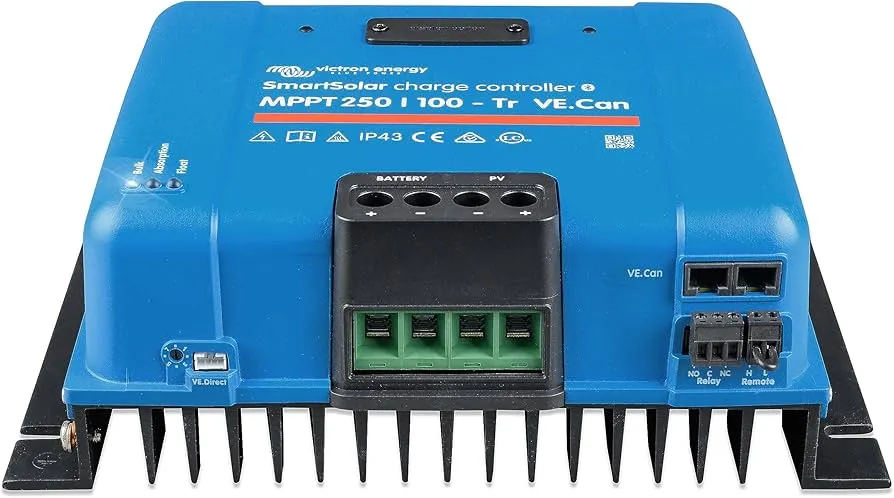
I chose the Victron SmartSolar 250V/100A MPPT controller for several reasons:
- High voltage capacity (250V) allows flexible panel configuration
- Quality brand with excellent reliability
- Built-in Bluetooth monitoring
- Efficient MPPT algorithms
While Victron is premium-priced, more economical options exist from brands like:
- Renogy
- EPEver
- MidNite Solar
System Monitoring
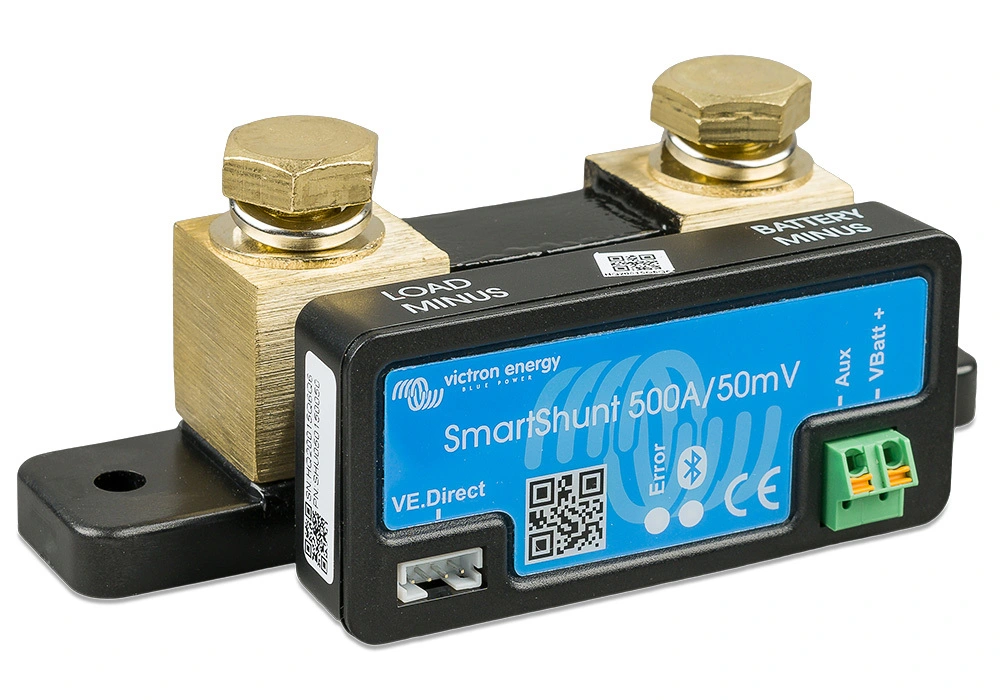
Adding a battery monitor is crucial for system management. The Victron Smart Battery Monitor:
- Installs inline at the bus bar
- Connects to charge controller via Bluetooth
- Provides real-time system stats:
- Battery voltage
- Current draw
- State of charge
- Power consumption history
Final Power Distribution
From the bus bars, power flows to:
- Inverter (48V DC → 120V/240V AC)
- Transfer switches (grid vs backup power selection)
- Home electrical panel
- Individual circuits/appliances
Always ensure proper fusing and wire gauge selection based on maximum current:
- 100A system → 2 AWG wire minimum
- Add appropriate fuses at each major connection
- Use proper crimping techniques for all terminals
Cost Breakdown: What to Expect
My complete system cost $7,109.07, but you can build a similar setup for under $5,000. The system is modular by design - I chose to build a larger 20KWH system with premium components, but you can start with a 10KWH system (using 4 batteries instead of 8) and skip the solar panel stands to save about $2,456 total:
- Reducing from 8 to 4 batteries saves $1,400 (4 × $350)
- Skipping solar panel stands saves $1,056 Each additional 2.5KWH of battery capacity costs around $350, making it easy to expand later.
Let's break down the core components that typically account for 70-80% of your investment:
1. Batteries: The Foundation (35-45% of total cost)
Batteries form the heart of your solar system, representing the largest investment. In my setup, I allocated $2,960 (41.6%) for eight 12V 200AH LiFePo4 batteries with built-in Battery Management Systems (BMS). While budget options exist, battery quality directly impacts system reliability and longevity - making this an area where cutting costs can prove expensive in the long run.
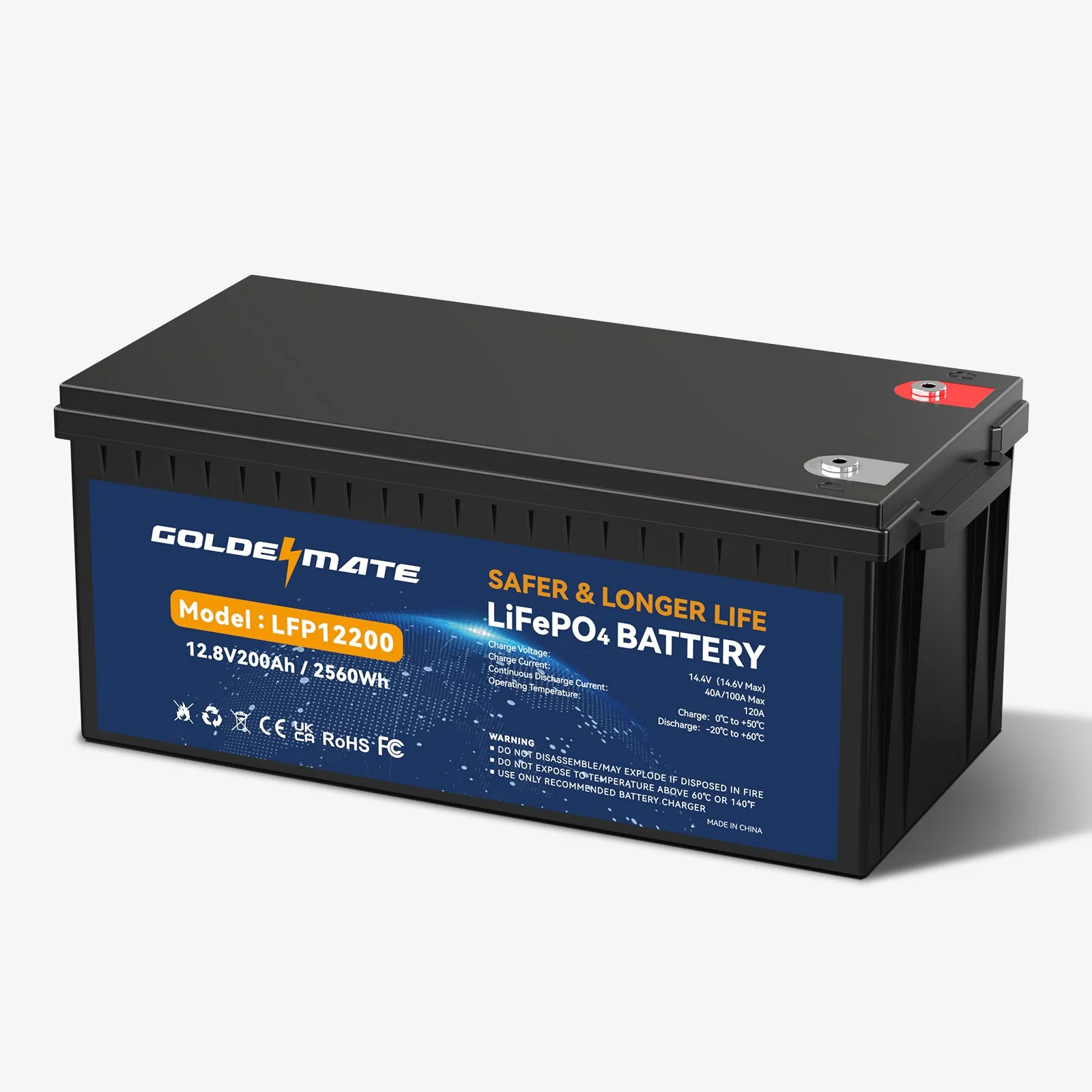
I went with Goldenmate batteries, which offer grade A LiFePo4 cells in excellent protective containers. You can get 15% off with my referral code.
While I chose Goldenmate for their good value / price ratio, several other reputable manufacturers offer quality LiFePo4 batteries:
| Brand | Price Range | Notable Features |
|---|---|---|
| Battle Born | $$$$ | • Made in USA • 10-year warranty • Excellent customer service |
| SOK | $$ | • Active BMS • Good price/performance • Growing community support |
| BigBattery | $$$ | • UL certified • Multiple form factors • Commercial grade options |
| JITA | $$ | • Budget friendly • Basic but reliable • Popular for DIY builds |
The key is finding the right balance between cost, reliability, and support for your needs. While premium brands like Battle Born offer superior warranties and service, mid-range options can provide excellent value without compromising essential features.
2. Solar Panels: The Power Source (15-25% of total cost)
For solar panels, I took an unconventional but cost-effective approach. Rather than purchasing new panels, I invested $1,200 (16.9%) in used 245W-250W panels sourced locally. This decision offered compelling advantages:
Benefits of Used Panels:
- Dramatic cost savings (50-75% below retail)
- Zero shipping expenses
- Immediate availability
- Environmental sustainability
Considerations:
- Efficiency loss of 10-15% from age
- Possible micro-fractures from thermal cycling
- No manufacturer warranty
For those with adequate installation space, used panels present an attractive value proposition. The slight reduction in efficiency can be offset by installing additional panels while maintaining significant cost savings.
3. Inverter: The Power Converter (5-10% of total cost)
My system uses a 4000W 48V inverter, representing $380 (5.3%) of the total investment. While a smaller expense comparatively, inverter selection requires careful consideration of:
- Battery voltage compatibility
- Peak power requirements
- Output waveform quality
- Future expansion needs
Supporting Components
The remaining investment covers essential system elements:
- Solar panel mounting hardware ($1,056 - 14.9%)
- Smart charge controller ($600 - 8.4%)
- Automatic transfer switch ($180 - 2.5%)
- Battery monitoring system ($110 - 1.5%)
- Safety equipment and wiring (~8%)
System Specifications
My complete 20KWH system includes:
- 48V 200AH Lithium Iron Phosphate batteries (8 x 12V 200AH in series)
- 24 x 245W-250W panels (3920W total)
- 16 x YL245P-29b
- 8 x Hyundai HiS-S250MG
- 48V, 4000W inverter with 8000W surge (pure sine wave 110V/120V)
- 4 circuit transfer switch (15A/120V per circuit)
- Powers refrigerator, entertainment system, 2 AC units, master outlets
- Planning 5th switch for home office
Note on 240V: This system handles 120V only. For 240V needs, consider these split phase inverters:
You can view the complete materials list here:
Electrical Performance of Solar Panels in my build
| Parameter | YL245P-29b | Hyundai HiS-S250MG |
|---|---|---|
| Power Output (Pmax) | 245 W | 250 W |
| Power Output Tolerances | ±5% | ±3% |
| Module Efficiency | 15.0% | 15.37% |
| Voltage at Pmax (Vmp) | 29.6 V | 30.6 V |
| Current at Pmax (Imp) | 8.28 A | 8.17 A |
| Open-circuit Voltage (Voc) | 37.5 V | 37.8 V |
| Short-circuit Current (Isc) | 8.83 A | 8.72 A |
General Characteristics
| Parameter | YL245P-29b | Hyundai HiS-S250MG |
|---|---|---|
| Dimensions (L / W / H) | 64.96 in x 38.98 in x 1.57 in (1650 mm x 990 mm x 40 mm) | 65.0 in x 39.0 in x 1.57 in (1650 mm x 990 mm x 40 mm) |
| Weight | 40.8 lbs (18.5 kg) | 41.9 lbs (19.0 kg) |
Options to make the build cheaper
Here are several key ways to save money while maintaining core functionality:
1. Optimize Solar Panel Mounting ($1,056 savings)
I spent $1,055.88 on solar panel tilt mounts and stands, which are aluminum rails that the solar panels mount to. These help optimize solar charge and efficiency over the long run by making sure the panels face south and at the optimal angle. The prebuilt aluminum rails cost around $40 per stand per panel.
You have several options to reduce this cost:
- Lay panels flat (simplest but takes ~15% efficiency hit)
- DIY tilting mounts using wood/metal
- Use cinderblocks for basic elevation
If going the DIY route, make sure your build is robust against inclement weather. The general consensus is that optimizing your solar panel tilt results in a 15% efficiency gain on average, depending on your seasonal tilt needs. But if you're skilled with DIY construction, you could save over $1000 here while still getting most of the benefits.
If you are limited on space, it could be easier to opt out of any solar stands, but it is an investment that pays dividends.
Use this calculator to determine your optimal panel angle based on location:
2. Consider All-in-One Inverter Systems
In my setup, I split my inverter, charge controller, fuses, battery disconnect, and battery monitors into their own separate components. This ensures greater modularity so that I can easily replace components in the future for whatever reason. I also spent around $900 for all of this.
While all-in-one solutions can save you $200-$300, they come with some additional requirements. You'll need to buy:
- Outlet boxes - Southwire MSB1G for organized management
- Circuit breakers - AC Miniature Circuit Breaker going to outlets for safety
- Outlets - Leviton T5320-WMP to deliver power
Additionally, if one of these hybrid solar inverters stops working for any reason, you better hope you are still under warranty, or you'll have to shell out another $600-$700 for a system, which essentially makes its not worth the price anymore.
3. Battery Cost Optimization
You can also consider going up the supply chain for your batteries to save money. Although this may not be as cost effective anymore now in 2024 due to Lithium surplus in the market. In the past, pre-packaged LiFePo4 batteries with BMS (battery management systems) built-in would cost a premium compared to buying LiFePo4 batteries in bulk without the BMS or packaging.
DIY Battery Pack Option
Doing your own LiFePo4 battery pack would involve buying individual 3V Lithium battery cells most likely from China via Alibaba, taping them together into larger sections in series and parallel. It honestly isn't terribly hard work, but given the decreasing $ / KW premium on the market, you can get a good pre-packaged LiFePo4 battery now for the same cost as the raw battery cells, and in my opinion, it isn't worth the hassle.
Used EV Battery Option
Another option that can be cheaper is buying used battery packs from electric vehicles. Many of these electric vehicles like Teslas have incredible battery packs that are around the 60KWH range +/- depending on the specific configuration. Many times, you can get a great deal on these used battery packs because it takes work to prepare them for home use.
I will warn you that this option may not be as DIY friendly due to the larger battery pack and electronics, so I wouldn't recommend unless you are very knowledgeable and confident in your skills. However, if you are able to acquire one and have the technical know-how, you can easily divvy up the battery pack into separate cells, or just use the massive 60KWH system for your home.
Conclusion
Building a DIY solar backup system is a significant undertaking that requires careful planning, research, and investment. While my complete 20KWH system cost around $7,000, I've shown how you can build a robust 10KWH system for under $5,000 by:
- Starting with 4 batteries instead of 8 ($1,400 savings)
- Skipping or DIY-ing the solar panel stands ($1,000+ savings)
- Considering all-in-one inverter solutions ($200-300 savings)
Remember that this system is not just about saving money - it's about energy independence and peace of mind during power outages. The modular approach I took may cost more upfront but offers key advantages:
- Easy expansion (each 2.5KWH battery addition costs ~$350)
- Component-level replacement instead of whole-system replacement
- Flexibility to upgrade individual parts as technology improves
- Better redundancy during component failures
Whether you follow my exact build or opt for a more budget-friendly version, focus on these core principles:
- Always prioritize safety in your electrical design
- Size your system based on actual power needs
- Choose quality batteries - they're the foundation of reliability
- Consider future expansion in your initial setup
- Document your build for easier maintenance
I encourage you to carefully consider your power needs, budget constraints, and technical comfort level when planning your build. Start small if needed - you can always expand the system later as your needs and expertise grow. The most important thing is to build a system that you understand and can maintain confidently.
For those interested in learning more, I've provided detailed calculators and resources throughout this guide to help you:
- Calculate optimal solar panel positioning
- Determine your daily power requirements
- Size your battery bank appropriately
- Select compatible components
Stay safe, and happy building!
Footnotes
- There are many freight shipping companies that service Puerto Rico. I personally went with Crowley Logistics - https://crowley.com. They have a simple system for creating an order via email and then giving you a booking number, where you can send heavy or hazardous material like LiFePo4 batteries to an address in Jacksonville, with auto forwarding to the port of San Juan